When a function depends on logic spread across multiple files such as controllers, services, and models CodeSpell enables smarter, context-aware results.
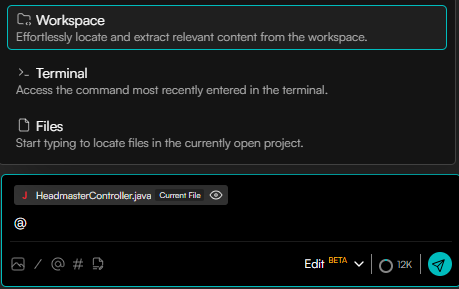
CodeSpell offers three context modes:
Workspace Context – Uses the entire project for a holistic understanding.
File Context – Includes one or more specific files.
Terminal Context – Leverages terminal output within the IDE to assist with debugging.
How to Use Context Mode
1) Workspace Context
Click on the @ icon and select Workspace to use the entire workspace as context.
2) File Context (Single or Multiple)
Click on the @ icon and choose one or multiple files you want to include as context.
3) Terminal Context
Click on the @ icon and select Terminal to use the in-IDE terminal output as context.


.svg)