Software testing finds defects; QA prevents them by shaping the entire SDLC. This guide covers what each term means, the types of testing you'll encounter, where QA fits in the SDLC, and how teams modernize this process today with automation and AI-driven tools.
Every line of code eventually meets a user. What happens at that meeting point, a smooth checkout, a crashed dashboard, or a payment that silently fails, is decided long before launch day.
That's the entire job of software testing and QA: making sure the gap between "it works on my machine" and "it works for everyone, every time" gets closed before your customers find it for you.
If you're new to this world, the vocabulary alone can feel like a wall. Testing, QA, QC, UAT, regression, smoke tests, and sanity checks get used interchangeably in standups and Slack threads, but they don't mean the same thing, and mixing them up has real consequences.
A team that thinks "QA" just means "someone clicked through the app before release" is going to ship very different software than a team that treats QA as a discipline baked into every sprint.
This guide is the foundation you actually need: clear definitions for the terms that get blurred together. By the end, you'll know not just what these terms mean, but which practices matter at your stage of growth, and what to look for when your team is ready to industrialize testing instead of improvising it sprint after sprint.
What Is Software Testing?
Software testing is the act of executing an application deliberately and systematically to find defects before your users do. It's not a final checkpoint before release; it's an ongoing process of probing whether the software behaves the way it's supposed to, under both the conditions you expected and the ones you didn't.
The goal isn't just "does it work." It's narrower and more useful than that: does the application behave as intended under expected conditions (a user logs in with the right password) and under unexpected ones (a user pastes a 500-character string into a name field, or 10,000 people hit checkout at the same time). Most production incidents don't come from the happy path; they come from the edge case nobody tested.
Who actually does this work?
It's rarely just one role:
QA engineers design and execute structured test cases, often owning the test strategy for a feature or release.
Developers write unit and integration tests as part of building the feature, testing isn't handed off; it starts at the keyboard.
End users get involved too, typically during User Acceptance Testing (UAT), where real stakeholders confirm the software actually solves their problem, not just that it runs without errors.
What Is QA (Quality Assurance)?
Quality assurance is the process of building quality into every stage of the SDLC — not inspecting for it after the fact. If software testing is about finding defects in a finished (or near-finished) build, QA is about engineering the conditions where fewer defects get created in the first place.
That distinction matters more than it sounds: QA is preventive; testing is detective. Testing catches what's already broken. QA reduces how much gets broken to begin with — by shaping how requirements get written, how code gets reviewed, what "done" actually means, and how teams learn from the defects that do slip through.
In practice, QA covers ground well beyond running test cases:
Process definition — how work moves from idea to release, and where quality checkpoints sit along that path
Requirement reviews — catching ambiguity and gaps in specs before a single line of code gets written against them
Test strategy — deciding what gets tested, how, and by whom, across the entire release
Continuous improvement — feeding defect patterns and retrospectives back into the process so the same category of bug doesn't keep recurring
QA Starts at Requirements, Not at Code Complete
If QA only enters once a feature is "code complete," it's too late to prevent anything, only detect it.
Real QA starts when requirements are being written:
Are they specific enough to test against?
Is there one unambiguous definition of "this feature works"?
Ambiguous requirements are one of the most common and most preventable sources of downstream defects. Every stakeholder fills requirement gaps with their own assumptions, and those assumptions rarely match
QA Is a Team Responsibility, Not a Single Role's Job
Treating QA as "the QA team's problem" undermines the whole point.That framing turns QA into a downstream checkpoint instead of a shared standard
QA only works when:
Product, engineering, and QA align on what "good" means before work starts
Developers treat writing testable, well-specified code as part of their own job, not someone else's safety net
Teams that operate this way tend to ship with measurably fewer defects, because quality becomes a shared standard, not a single gate
Software Testing vs QA vs Quality Control (QC) — What's the Difference?
These three terms get used as if they're interchangeable, and that's exactly where confusion starts. Each one operates at a different scope: testing is tactical, QC is inspection, and QA is process-wide.
Testing is the activity of executing the application to find specific defects
QC (Quality Control) is the inspection layer checking finished outputs (a build, a release candidate) against defined standards before they ship
QA (Quality Assurance) is the umbrella, the process-level discipline that shapes how requirements, code, and testing happen in the first place
Aspect
Software testing
Quality control (QC)
Quality assurance (QA)
Scope
Tactical, a specific activity
Inspection — checking outputs against standards
Process-wide, shapes how work gets done
Nature
Detective
Detective
Preventive
When it happens
During and after development
After a build or release candidate is ready
From requirements through delivery
Primary question
Does this feature work as specified?
Does this output meet our defined standard?
Are we building quality into the process itself?
Owned by
QA engineers, developers
QC inspectors, release managers, QA
Entire team: product, engineering, QA
Example activity
Running a test case against a login form
Verifying a release candidate against a quality checklist before sign-off
Defining acceptance criteria during requirement reviews
Goal
Find defects
Confirm output quality before release
Reduce the number of defects created in the first place
Gaps here show up as bug tickets and broken user flows
Usually the first thing tested, because it's tied directly to "did we build the thing we said we'd build?"
2. Non-Functional Testing
Verifies how well the software performs, not just what it does
Performance — does the app stay responsive under load, or degrade at scale?
Load/stress — what happens at 10x expected traffic, or when resources run out?
Security — can it resist injection attacks, unauthorized access, or data exposure?
Usability — can a real person navigate it without confusion or friction?
Gaps here tend to surface later and more expensively — as outages, breaches, or churn, not bug tickets
3. Manual Testing
A person executes test cases by hand, using judgment rather than a fixed script
Best for exploratory testing — probing the app without a predefined path, the way a real user might
Strong for catching UX friction, visual bugs, and unexpected edge cases automation wouldn't think to check
Doesn't scale — re-running the same checks every sprint eats time that's better spent elsewhere
4. Automated Testing
Scripts execute predefined test cases and flag failures without human involvement
Best for repetitive, high-frequency checks — regression suites, smoke tests, CI/CD pipelines
Requires upfront investment to write and maintain scripts, but pays off fast as release frequency increases
Increasingly built with AI assistance — generating test cases directly from requirements or Jira tickets instead of hand-coding every script
5. Unit, Integration, System, and Acceptance Testing
Unit testing — tests a single function or component in isolation, usually written by developers
Integration testing — tests how multiple components work together (e.g., does the payment service correctly talk to the order service?)
System testing — tests the entire application end-to-end, as a complete, integrated system
Acceptance testing (UAT) — real users or stakeholders confirm the software solves their actual problem, not just that it runs without errors
Each layer catches different failure types — a bug that slips past unit testing might still be caught at integration, and one that slips past both might surface at UAT
6. Regression Testing
Re-runs existing test cases after a code change to confirm nothing that used to work has broken
Critical in any team shipping frequently — every new feature or fix is a chance to silently break something unrelated
One of the strongest candidates for automation, since the same test cases run repeatedly with little variation
Skipping regression testing is a common shortcut under release pressure, and a common source of "it worked yesterday" incidents
The app stays responsive under load, resists injection attacks, feels intuitive to use
Common categories
Unit, integration, system, UAT
Performance, security, usability, reliability
Where gaps show up
Bug tickets, broken user flows
Outages, breaches, customer churn
When it's usually tested
Throughout development, tied to each feature
Often later, and that delay is a common mistake
The QA Lifecycle — How Quality Gets Built Into the SDLC
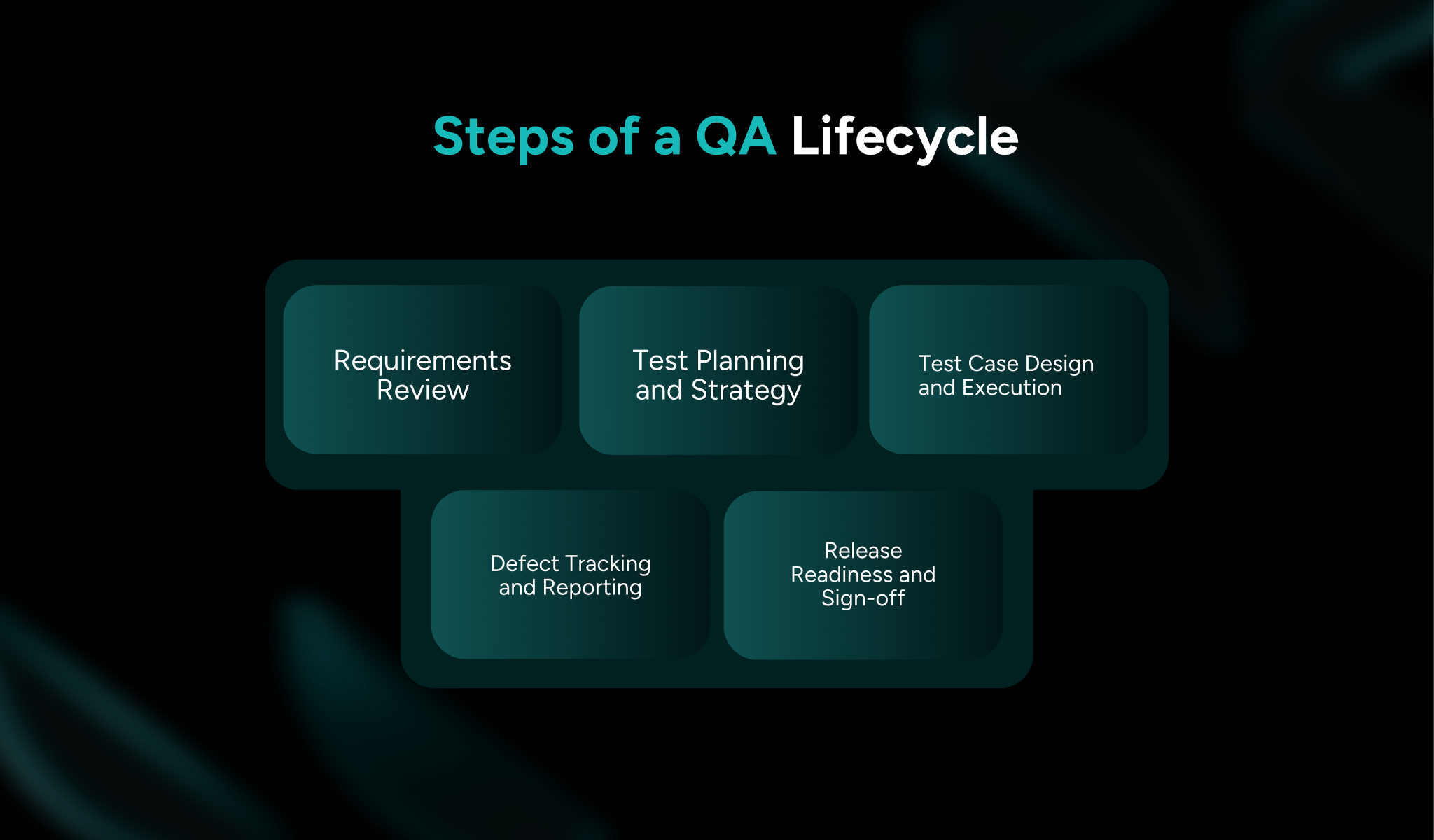
Requirements Review
Test Planning and Strategy
Test Case Design and Execution
Defect Tracking and Reporting
Release Readiness and Sign-off
QA runs parallel to the SDLC, with checkpoints from day one to release, not a single step bolted on at the end.
1. Requirements Review — Catching Ambiguity Before It Becomes a Bug
Surface ambiguous or contradictory requirements while they're still cheap to fix.
"The system should load quickly" isn't testable; reviews push for specifics (e.g., under 2 seconds at 95th percentile)
Unresolved ambiguity gets filled in later by assumptions, and that's where defects start.
2. Test Planning and Strategy — Defining What "Done" and "Covered" Mean
Decides what gets tested, how deeply, and by whom
Sets coverage targets that need exhaustive testing, and which need lighter checks
Defines the manual-vs-automation split based on what's repetitive vs. judgment-based
Without this, "done" varies by whoever happens to be testing.
3. Test Case Design and Execution — Where Testing Lives Inside QA
Test cases are written against reviewed requirements, covering functional and non-functional behavior.
Execution mixes manual (exploratory, UX) and automated (regression, repetitive checks)
Each test case should trace back to a specific requirement, so that coverage gaps are visible rather than assumed.
4. Defect Tracking and Reporting — Feedback Loop Back to Development
Defects get logged, prioritized, and routed back to development, the loop that keeps QA continuous, not a one-time gate.
Good reports capture severity, repro steps, and the requirement or test case the failure traces to
Defect patterns feed back into requirements review and strategy; skip this, and the same bugs resurface release after release.
5. Release Readiness and Sign-off — QA's Final Checkpoint
Confirms the build meets the bar set at test planning, not a last-minute judgment call
Reviews open defect severity, coverage of critical paths, and non-functional validation
Should be a formality if earlier stages went well; if it's a fire drill, the fix is upstream, not a stricter gate.
Closes the loop back to requirements review for the next cycle
What are the Common Challenges Beginners (and Teams) Run Into
Knowing the definitions is one thing; avoiding the mistakes that almost every team makes early on is another. These five show up constantly, and they tend to compound each other.
1. Test Cases Written From Memory Instead of Requirements
It's tempting to write test cases based on "what the feature is supposed to do," recalled from a standup or a Slack thread, instead of going back to the actual requirement document.
The problem: memory fills gaps with assumptions, and those gaps become coverage gaps. A test suite built this way often looks complete until a requirement nobody remembered gets shipped untested.
2. Manual Regression Cycles That Don't Scale With Release Frequency
Manual regression testing works fine when releases happen monthly. It breaks down fast once a team moves to weekly or daily releases, the same test cases need to be re-run every cycle, and there simply isn't enough QA bandwidth to keep pace by hand.
This is usually the moment teams either cut corners on regression coverage (risky) or finally invest in automation (overdue).
3. Siloed UI, API, and Mobile Testing Tools Creating Duplicate Maintenance Work
Many teams end up running separate tools for UI testing, API testing, and mobile testing, each with its own test cases, its own maintenance overhead, and no shared visibility.
The same underlying feature gets tested three different ways in three different systems, and when something changes, someone has to remember to update all three. That duplication is pure overhead, not extra coverage.
4. No Traceability Between a Requirement and the Test That Validates It
Without a clear link from requirement → test case → result, nobody can answer a basic question with confidence: is this requirement actually covered?
Coverage gaps stay invisible until a bug ships, at which point the question becomes "how did we miss this?" instead of "did we ever test it?" Traceability isn't bureaucracy; it's the only way to know what "tested" actually means.
5. QA Treated as a Sprint-End Checkpoint Instead of a Continuous Process
When QA only enters the picture right before a sprint closes, it inherits all the risk that better requirement reviews and earlier test planning would have prevented. By that point, QA can only detect, not prevent, and every defect found late costs more to fix than the same defect caught at the requirements stage.
This is the same testing-vs-QA distinction from earlier in this guide, showing up as a real, recurring team habit rather than just a definition.
How TestSpell by SoftSpell Supports Modern Software Testing and QA
Everything covered so far has been the theory: definitions, lifecycle stages, the gap between testing and QA, and the challenges that trip teams up along the way.
TestSpell is SoftSpell's AI-powered test automation tool, built to automate the QA lifecycle from requirement to report rather than treating testing as one disconnected step bolted onto the end of development. It's worth seeing what that looks like in practice, even if your team is still years away from needing the full version.
1. Test Case Generation From Requirements and Jira
Test cases get generated directly from requirements or Jira inputs, instead of being written from memory.
Coverage reflects what was actually specified, not what a QA engineer had time to write that sprint.
Test inputs update automatically as requirements change, so the suite doesn't quietly go stale the moment a spec shifts.
2. Unified UI, API, and Mobile Testing in One Pipeline
Replaces separate Selenium, Postman, and Appium maintenance with one pipeline that runs UI, API, and mobile tests in one flow.
One trigger, one execution report, test runs go parallel instead of sequential.
Eliminates the duplicate maintenance that comes from updating the same test logic across three disconnected tools.
3. Execution Reports Organized by Sprint, Module, or Full Suite
Tests can be organized by modules, sprints, or full suites, with reports structured around how teams actually work, not a generic test log.
Product owners get release readiness by feature, QA engineers get module-level coverage, leadership gets suite-level risk.
Everyone gets the view relevant to their decision, drawn from the same underlying execution reports.
4. Testing Connected to the Full SDLC
TestSpell works alongside ReqSpell (requirements) and CodeSpell (code generation) as part of SoftSpell's connected SDLC platform, integrating directly into the SDLC so testing evolves with the development process.
Because ReqSpell maps requirements to test cases with built-in traceability, the "no link between requirement and test" gap from the previous section has a direct answer here, not a workaround.
Shift-left by design, testing starts at requirements, not after code review, the same principle this guide has been building toward all along.
Enterprise-ready: role-based access, data governance, and scalable parallel execution for teams operating at scale, built to support every role across the SDLC, from QA engineers and developers to product owners and enterprise teams.
Closing Thoughts
Software testing and QA aren't competing concepts testing is the activity, and QA is the process that surrounds it, shapes it, and decides how much testing even needs to happen. Confusing the two is how teams end up with detection systems instead of prevention systems.
Beginners who internalize that distinction early build better habits from day one: writing testable requirements instead of vague ones, thinking about coverage before code is "done," and treating quality as continuous rather than a checkpoint squeezed in before release.
The teams that scale this well aren't the ones with the most QA headcount; they're the ones who pair process discipline with the right automation so testing keeps pace as release frequency climbs instead of becoming the bottleneck.
If you're at that stage, see how TestSpell automates the full QA lifecycle, from requirement to report. Book a demo to see it against your own workflow.
1. What is the difference between software testing and QA?
Software testing focuses on identifying defects in an application by executing test cases. Quality Assurance (QA) is a broader discipline that establishes processes, standards, and best practices to prevent defects throughout the Software Development Life Cycle (SDLC).
2. Is software testing a good career for beginners?
Yes. Software testing offers an excellent entry point into the software industry. Beginners can start with manual testing, learn QA fundamentals, and gradually build skills in automation, performance testing, security testing, and AI-powered testing.
3. What are the main types of software testing?
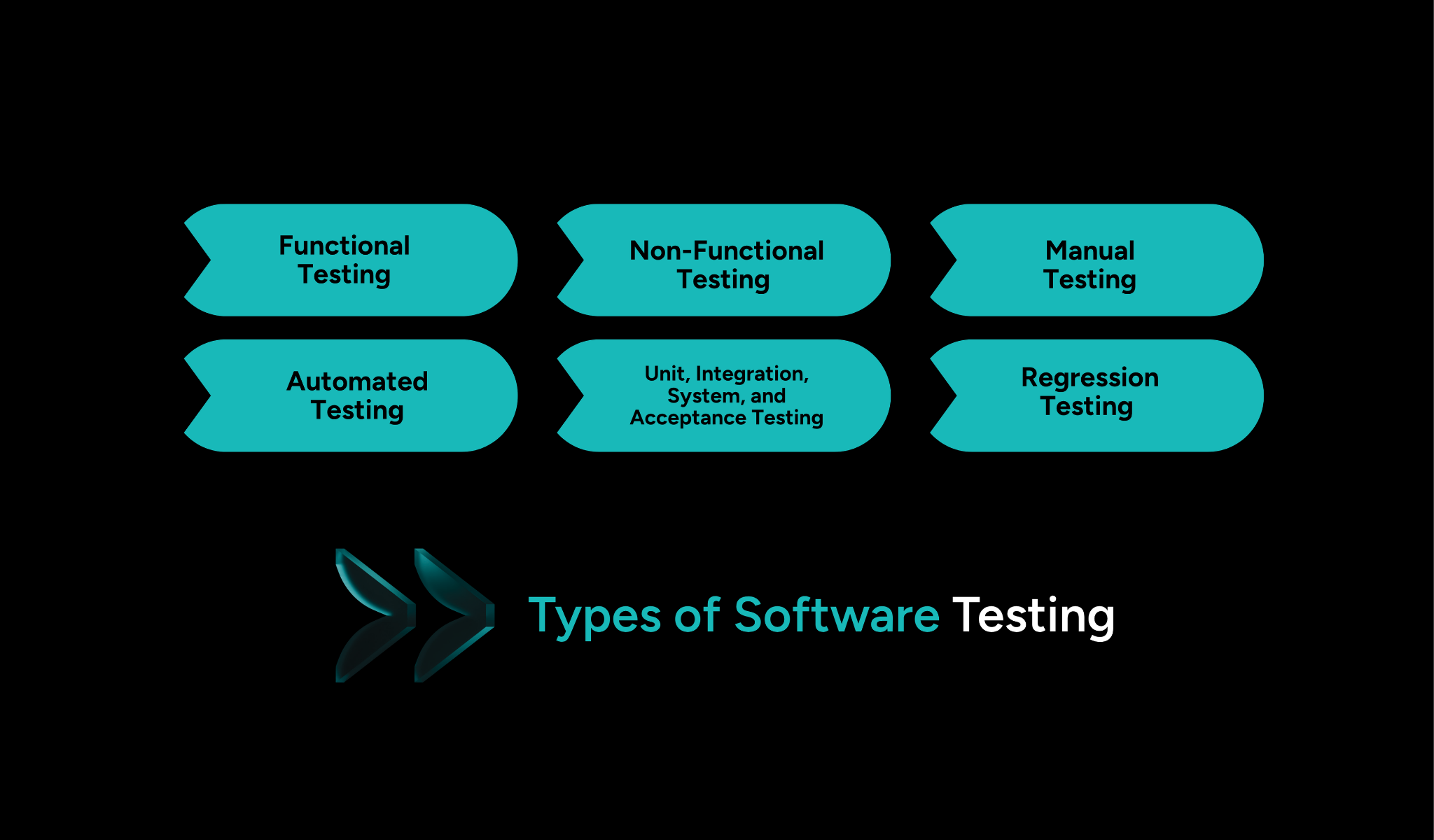
The most common types include functional testing, non-functional testing, manual testing, automated testing, unit testing, integration testing, system testing, acceptance testing, and regression testing. Each serves a different purpose in ensuring software quality.
4. When should QA begin during software development?
QA should begin at the requirements stage—not after development is complete. Early involvement helps identify unclear requirements, reduce costly rework, and improve collaboration between product, development, and testing teams.
5. Why are automated QA testing tools important?
Automated QA testing tools help teams execute repetitive tests faster and more consistently. They improve regression testing, increase test coverage, support CI/CD pipelines, and enable faster software releases while reducing manual effort.



.svg)




.png)


