AI tools automate coding, testing, and requirement management.
This gives you more time for complex work.
As demands grow and deadlines tighten, AI copilots support routine tasks and improve collaboration. They help you speed up the entire workflow.
In this blog, you will see how a software development copilot like SoftSpell can is beyond just code autocomplete.
What Is an AI-Powered SDLC?
An AI-powered Software Development Life Cycle brings artificial intelligence into every stage of software development. It supports you from requirement gathering to testing and deployment. It helps you manage the entire process in a smarter way.
These tools automate repetitive tasks and improve your workflows. They also give you useful insights that guide better decisions. As a result, your development team works faster and more efficiently. You also maintain higher-quality code across every stage.
Why a Software Development Copilot Is Beyond Code Autocomplete
AI-powered SDLC copilots are changing how you build software. They offer much more than simple code completion. They support, improve, and speed up every key stage of the SDLC. As a result, your team builds better software in less time.
Automating the Requirement to Code Journey
AI copilots bring structure and clarity when you turn scattered requirements into organized code. They make this complex task easier to manage. Here is how they support you in this important phase:
Automating Requirement Extraction: AI pulls and organizes requirements from unstructured sources such as legacy code, product documents, emails, and PDFs. This removes the need for manual sorting across different formats.
Simplifying Requirement Grooming: AI tools identify and group business needs from product documents and email conversations. This helps your team align on requirements quickly and avoid confusion.
Reverse Engineering Legacy Code: AI tools study your existing codebase and identify modules, dependencies, and scope. They turn outdated systems into structured insights that support new projects.
Test Coverage Validation: AI tools connect requirements to test cases automatically. This ensures you test every path and verify every feature. It also speeds up your quality assurance process.
Accelerating Coding with AI Assistance
AI copilots help you move faster by handling repetitive work and offering real-time support. They stay with you throughout the coding process. Here is how they help:
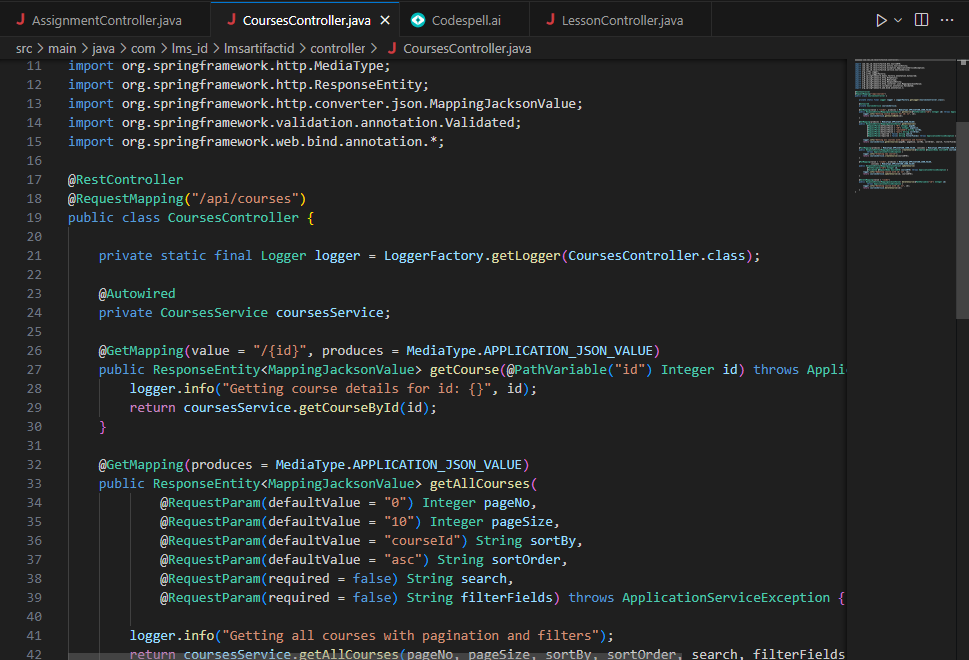
Code Generation: AI-powered copilots create basic code structures for you. This helps you set up projects quickly without writing repetitive components from scratch.
Code Documentation: AI tools create documentation for your codebase automatically. This keeps your documentation clear and accurate without extra effort from your team.
Code Optimization: AI reviews your code and improves performance and readability. It finds inefficiencies and suggests better approaches. This helps you refine your code with minimal effort.
Code Suggestions: AI-powered copilots give real-time and context-aware suggestions. They help you write cleaner and more consistent code. This reduces errors and improves productivity.
Unit Testing: AI tools create unit tests automatically. This helps you catch bugs early and keep your code reliable throughout development.
AI-Powered Test Automation
AI copilots add strong value to your testing process. They automate and improve each stage of the test lifecycle. Do you want to strengthen quality without slowing down delivery? Here is how they support quality assurance:
Test Case Generation: AI converts requirements, user stories, or JIRA inputs into detailed test cases. This speeds up test creation and ensures tests match your product needs.
End-to-End Coverage: AI copilots test every layer of your product, including interface, API, and mobile. This full coverage prevents testing gaps and helps you catch issues early.
Root Cause Analysis: AI tools do more than detect test failures. They analyze the root cause of each issue. This helps your team fix problems faster and with greater accuracy.
How AI Copilots Enhance Productivity in the SDLC
AI copilots boost productivity by supporting you in daily development tasks. They take care of routine work so you can focus on high-priority tasks. This helps you move faster and stay focused on what matters most.
Reducing Manual Effort: AI copilots help you with debugging, code improvement, and early issue detection. They reduce the manual work you handle during development.
Optimizing Development: AI tools give you real-time suggestions to refine your code. They help you improve performance and maintain consistency across your projects.
Accelerating Testing: AI creates and runs test cases for you. This reduces the time you spend on manual testing and speeds up the overall process.
SoftSpell: Revolutionizing the SDLC with AI
SoftSpell leverages AI to streamline and accelerate every stage of the Software Development Life Cycle (SDLC), helping teams collaborate, build, and deploy with confidence.
ReqSpell: Automating the Requirement-to-Code Journey
Requirement Grooming: Extracts and organizes business needs from unstructured sources like PDFs, emails, and product docs.
Reverse Engineering: Analyzes legacy codebases to identify modules, dependencies, and functional scope.
Test Coverage Validation: Traces requirements to test plans and highlights untested paths.
Cross-Team Alignment: Uses natural language to query across documents, test artifacts, and code modules.
CodeSpell: Your AI Coding Sidekick
Code Generation: Automates foundational code creation, saving time on repetitive tasks.
Code Documentation: Generates clear, comprehensive documentation to keep code maintainable.
Code Explanation: Decodes complex logic with AI-generated explanations, improving understanding.
Design to Code: Converts Figma designs into production-ready React, Angular, or React Native code in minutes.
Test Case Generation: Automatically generates test cases from requirements or JIRA inputs.
Comprehensive Testing: Runs UI, API, and mobile tests in one flow, reducing manual effort.
Faster Feedback: Speeds up QA cycles, helping teams ship faster with fewer bugs.
Conclusion
What if you could boost your development process and deliver better software faster?
We have explored how AI-powered tools like SoftSpell support, improve, and speed up every stage of the SDLC. They help you from requirement gathering to testing and deployment.
To unlock real growth and efficiency, you need the right AI SDLC tool. It should help your team work smarter, not harder. A software development copilot can make that shift possible.
AI-powered tools support requirement gathering, coding, testing, and deployment. They automate routine work and give real-time guidance. This helps you focus on complex tasks and deliver reliable software faster.
2. Is AI copilot just about code autocomplete?
No, it works beyond code autocomplete. It helps you with coding, debugging, optimization, and testing. This reduces manual effort and improves development speed.
3. Can AI really improve SDLC productivity?
Yes, AI improves productivity by handling repetitive tasks and speeding up feedback cycles. SoftSpell help you save time during setup, debugging, and testing. This allows your team to move projects forward faster.
4. What are the benefits of SDLC automation?
SDLC automation explained means using AI to simplify manual work across the development cycle. It reduces errors, speeds up delivery, and improves consistency. You achieve better quality in the final product.
5. Why is it important to adopt AI in software development?
AI helps your team stay competitive by improving productivity and code quality. It reduces errors and supports changing requirements. With the right tools, you deliver stronger software in less time
Market researcher at SoftSpell, uncovering insights at the intersection of product, users, and market trends. Sharing perspectives on research-driven strategy, SaaS growth, and what’s shaping the future of tech.


.svg)
.jpg)