


Changelog
July 1, 2026
.svg)
.jpg)
Are your releases slowing down even as your team grows?
In many enterprises, QA has become a bottleneck that teams often ignore. Your sprints finish, and your code is ready. But testing delays the release by days or even weeks.
A recent industry report shows that only 33% of teams focus on improving test reliability. Only 29% focus on reducing defects.
The real cost is not your testing tool budget. You lose time due to delayed releases.
In this blog, you will see a clear way to evaluate QA automation software. You will also learn the signs that show a tool will not scale. Moreover, you will understand how to choose a tool that works well.
Most QA automation problems do not start with the wrong tool. They start with wrong expectations about what the tool should do.
Enterprises that struggle with QA at scale usually fall into one of three patterns. You might already see one of these in your team.
The Legacy Automation Trap
Your team built a framework a few years ago. It worked well at that time. Now it runs on one engineer’s system. It breaks whenever you add a new service. Most people outside QA do not know how to use it. Scaling this setup needs more than maintenance. It needs a rebuild.
The Coverage Illusion
Your test suite may show thousands of passing tests. At first, this looks like success. But when you look closely, you may see gaps. Your UI flows may be covered, but your API layers and mobile experiences may not be tested. A high test count feels good, but gaps lead to real issues in production.
The Integration Disconnect
QA often starts after development ends. Each release then becomes a manual handoff. Your pipeline slows down. Developers wait for testing to finish. Your release date keeps moving. This is not just a process issue. It is a structural gap that the right QA automation software should solve.
Most software evaluation processes treat QA tool selection like a feature checklist. That approach does not work.
At enterprise scale, you should treat QA automation testing tools as a key infrastructure decision. You need to look at it across four areas.
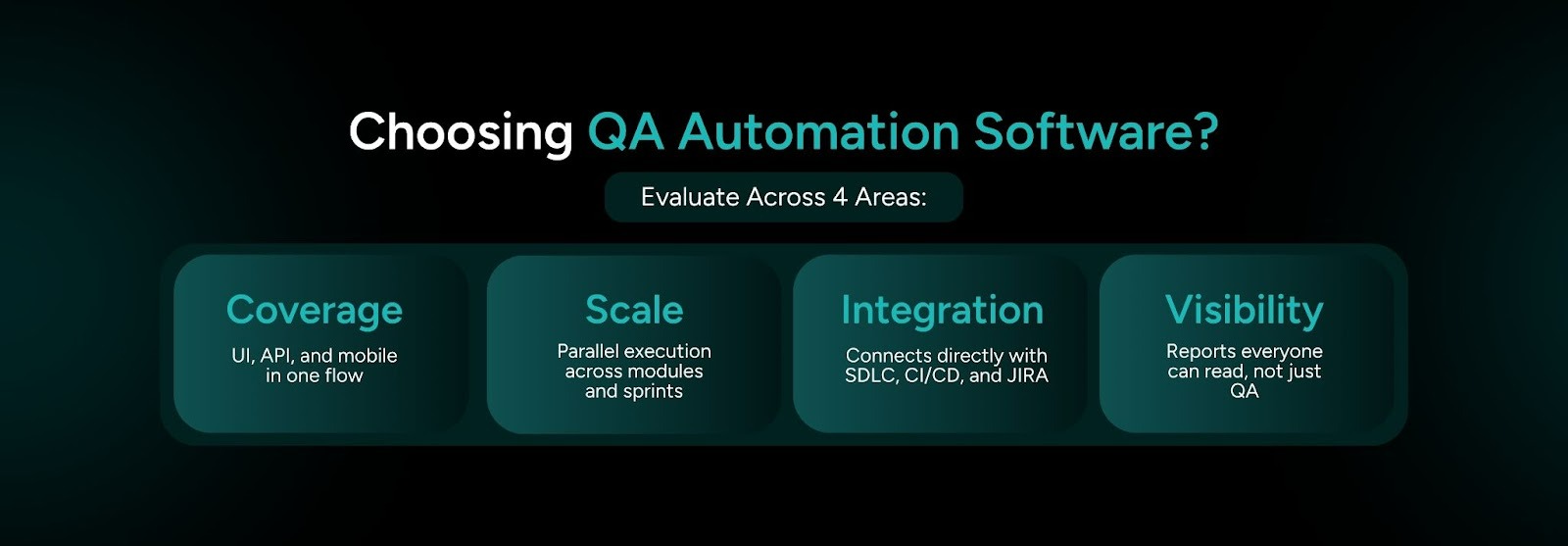
If a tool fails in any one of these areas, it creates a new bottleneck. It replaces the problem you wanted to solve.
The Evaluation Criteria Enterprises Actually Need
So what does a strong evaluation look like? You should test your shortlist against the right factors. Many teams miss these points.
Think about how you evaluate tools today. Do you focus on what looks good in a demo, or what works in real production conditions?
The Questions Most Teams Forget to Ask
Pilots can mislead you. A tool may work well with 200 test cases in a controlled setup. The same tool can fail when you run 20,000 test cases in production. You should watch for these signals before you decide.

TestSpell from SoftSpell automates your full test lifecycle. It covers everything from the requirements to the report. This helps your quality keep up with development. It does not fall behind.
It creates test cases directly from requirements, user stories, or JIRA inputs. You do not need manual steps or back and forth between teams. Your coverage starts at the same point as your development process.
What TestSpell covers in one flow:
Here is what makes it stand out at enterprise scale.
Built for every role in your SDLC:
TestSpell connects with JIRA, Azure DevOps, Postman, and LambdaTest. It includes role-based access control and project management features for large and distributed teams.
This is not a separate testing tool that you add to your pipeline. TestSpell works directly within your SDLC. It grows as your development process grows.
The result is shorter QA cycles, fewer defects in production, and releases your team delivers with confidence. You can already see how this improves your workflow.
What is the real cost of shipping one more release without the right QA automation software?
This blog explained why enterprise QA slows down. It also showed the four key areas that separate tools that scale from tools that do not. You also saw the criteria your team should use before you shortlist vendors. In addition, you learned the signals that show a tool may fail before you commit to it.
You need to fix your QA process before it turns into a delivery issue. You should not wait for the next missed release date. Tools like TestSpell from SoftSpell help enterprises with unified coverage, pipeline integration, and clear visibility across teams.
Make the decision today that your team will benefit from over the next year.





July 1, 2026
Don’t Miss Out
We share cool stuff about coding, AI, and making dev life easier.
Hop on the list - we’ll keep it chill.

© 2026, SoftSpell. All Rights Reserved


