


Changelog
July 1, 2026
.svg)
.jpg)
Looking for better Cursor alternatives? While Cursor is a great AI assistant, many developers are seeking alternatives due to a few key reasons:
That's where CodeSpell shines. In this CodeSpell vs Cursor comparison, we’ll show you why CodeSpell is the ideal alternative for optimizing your workflow and boosting team productivity.
CodeSpell
CodeSpell automates repetitive coding tasks like project setups and base code structures. It saves you time and effort during development. It eliminates the need to handle these tasks manually.
Cursor
Cursor focuses on predictive code completion and automatic code imports across files. While it does a great job of assisting with smaller, incremental coding tasks, it doesn't fully automate project setups or generate complete code structures like CodeSpell does.
Which is better?
CodeSpell is better for teams that want to automate repetitive coding tasks, from project setups to generating full code structures. Cursor is great for code completion, but lacks the automation of larger tasks that CodeSpell excels at.
CodeSpell
One of CodeSpell’s standout features is automatic documentation generation. It creates clear and detailed documentation for your code. This makes the code easier to maintain and understand for other developers.
It also provides instant explanations for complex code logic. This helps you avoid spending time searching through documentation.
Cursor
In comparison, Cursor does not emphasize auto-documentation generation. Developers are expected to write documentation manually, using in-line comments for basic clarity. There is also no robust AI feature for explaining complex code logic, which can slow down the development process.
Which is better?
CodeSpell is better for teams needing automated documentation and AI explanations to maintain clear and understandable code. Cursor requires more manual effort and lacks in-depth explanations.
CodeSpell
CodeSpell shines when it comes to code optimization. It suggests improvements to make your code more efficient and readable, ensuring that it remains scalable and future-proof.
Cursor
Cursor offers minimal AI support for code optimization. While it helps with predictive code completion, it doesn't focus much on refactoring or performance improvements. If you want to optimize your code, you'll have to do most of it manually.
Which is better?
CodeSpell is better for teams that want AI-assisted refactoring and optimization to improve their code’s performance and readability. Cursor does not provide the same level of support for optimization.
CodeSpell:
CodeSpell delivers strong security for large teams with features like Single Sign On and role-based access control. It protects data privacy by ensuring it never uses user content to train AI models. It also applies strict guardrails to AI-generated content. This helps teams follow internal rules and usage standards.
Cursor:
Cursor primarily relies on VS Code's built-in security features and lacks advanced enterprise-grade options.
Which is better?
CodeSpell is the clear winner here with its enterprise-grade security and scalability features. Cursor falls short in this area, lacking the security measures required for large organizations.
CodeSpell
CodeSpell integrates smoothly with multiple tools. It supports a wide range of tech stacks. This makes it a good fit for teams using different technologies. It can also convert design files directly into code using its Figma to Code feature.
Cursor
Cursor is primarily optimized for VS Code, limiting its compatibility with other IDEs. While it does integrate well with VS Code, teams using different technologies or IDEs may find it less flexible than CodeSpell.
Which is better?
CodeSpell is better for teams working with various tech stacks and IDEs. Its wide compatibility makes it more suitable for diverse enterprise environments. Cursor, on the other hand, is ideal for those solely using VS Code.
CodeSpell
CodeSpell offers automated unit test generation and AI-supported debugging. This helps ensure your code works as expected before deployment. It finds issues early in the development process.
This allows you to fix problems faster and lower the risk of bugs reaching production.
Cursor
Cursor includes Bugbot, which detects bugs with a low false positive rate. While Bugbot helps identify issues, it doesn’t offer unit testing or AI-driven debugging. This means debugging still relies heavily on manual effort.
Which is better?
CodeSpell is better for teams that need automated unit testing and AI-assisted debugging. Cursor provides some bug detection but lacks the robust testing and debugging features that CodeSpell offers.
CodeSpell
CodeSpell shines in team collaboration with its Design Studio feature. It allows teams to work together in real time on design-to-code workflows. Developers can collaborate easily on code generation and design updates, streamlining the development process.
Cursor
Cursor is mainly designed for individual developers, with limited collaboration features. It doesn’t support real-time team collaboration in the way CodeSpell does, making it less suitable for large teams working on shared projects.
Which is better?
CodeSpell is better for teams that need real-time collaboration. Cursor is ideal for solo developers or small teams, but it lacks the collaboration features necessary for larger teams.
.jpg)
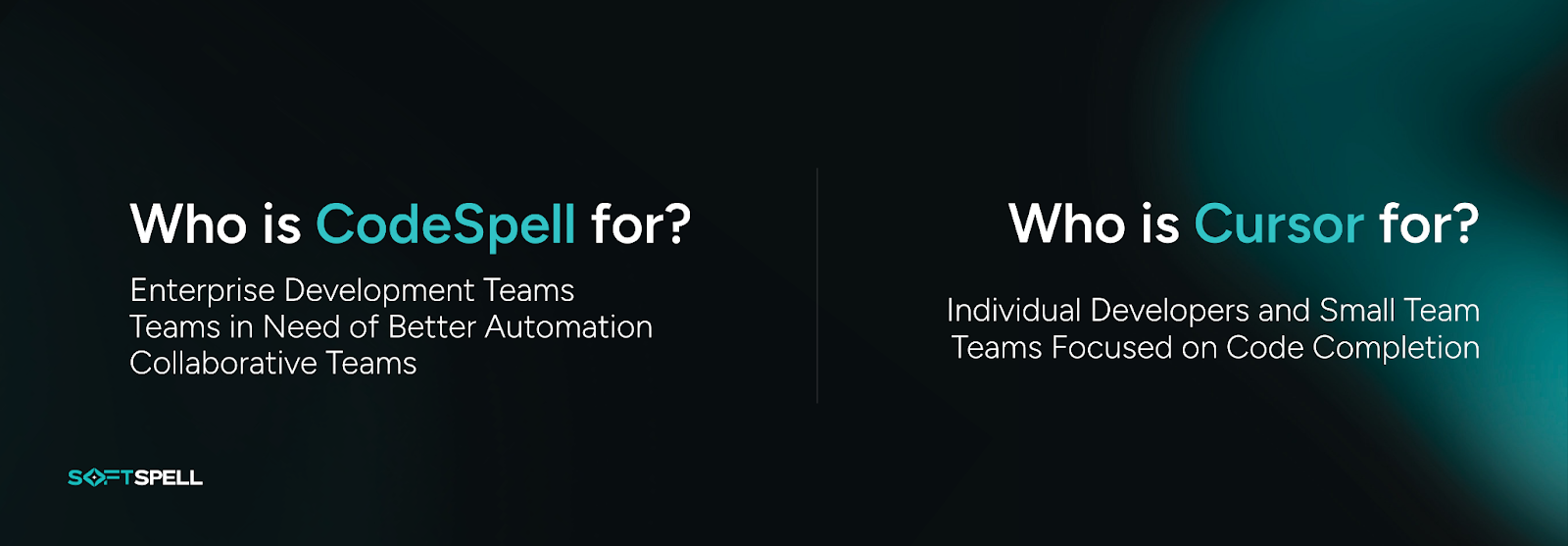
In this CodeSpell vs Cursor comparison, we clearly see the difference between the two tools.
CodeSpell supports large teams that need complete AI assistance. It helps with code generation. It also supports unit testing and other key development tasks. Teams can manage complex workflows without slowing down.
Cursor, on the other hand, works well for individual developers and small teams. It fits naturally into VS Code. It offers solid AI code completion and predictive support. However, it does not offer the same depth or ability to scale as CodeSpell.
Teams that want to improve workflows at scale will find CodeSpell more suitable. Teams with simpler and lighter needs can still use Cursor effectively.



July 1, 2026
Don’t Miss Out
We share cool stuff about coding, AI, and making dev life easier.
Hop on the list - we’ll keep it chill.

© 2026, SoftSpell. All Rights Reserved


