


Changelog
July 1, 2026
.svg)
.png)
May was focused on making SoftSpell more context-aware, flexible, and easier to use across development teams. From deeper IDE intelligence to improved user management and a refreshed console experience, these updates help teams work faster with less friction.
New Features
SoftSpell's Agent Mode now provides a more autonomous and streamlined development experience.
The workflow begins with the agent asking what needs to be accomplished, allowing users to describe their requirements in natural language without navigating complex configurations.
Once a prompt is provided, the agent analyzes the indexed application and generates a detailed execution plan outlining the proposed changes.
Planner
Before any implementation begins, the generated plan is presented to the user for review.
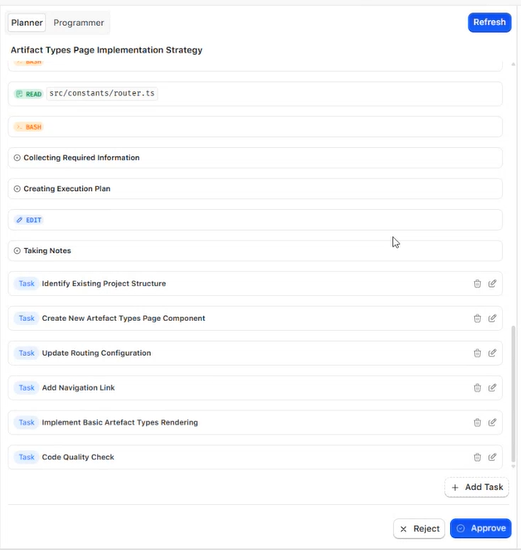
With Planner, users can:
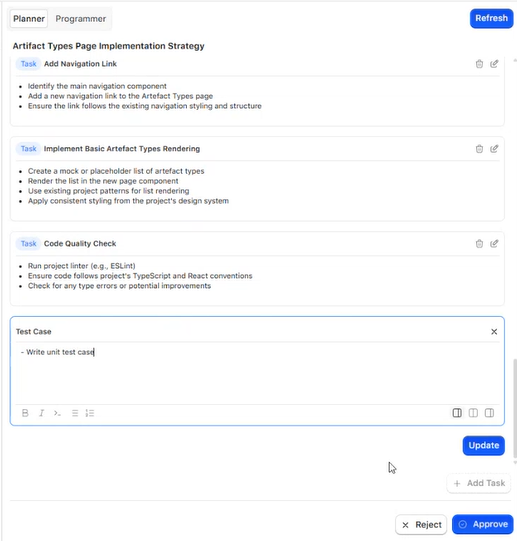
This human-in-the-loop approach provides greater control while maintaining the speed and efficiency of AI-assisted development.
Automated Implementation & Pull Request Creation
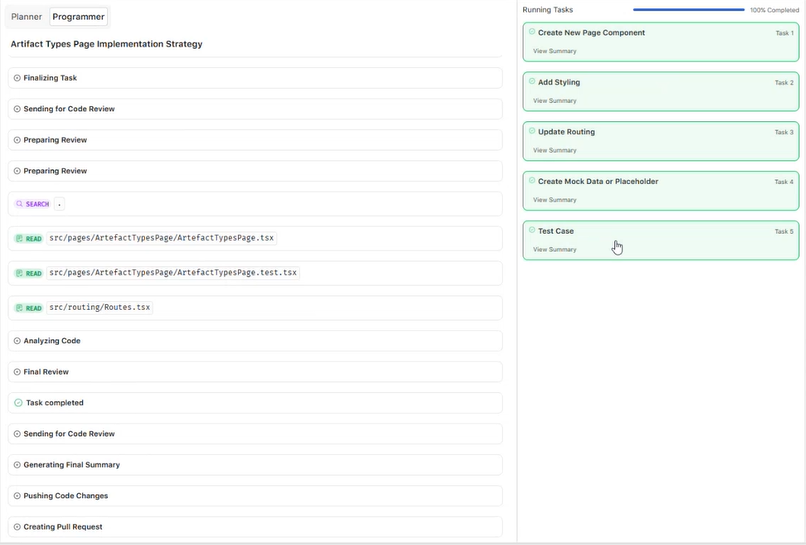
After the plan is approved, the agent automatically executes the required changes across the codebase.
The agent then:
This enables teams to move seamlessly from planning to implementation while maintaining standard development and governance workflows.
SoftSpell now understands your entire workspace inside Eclipse and IntelliJ IDEA.
Previously, users needed to manually attach multiple files to provide context. With Workspace Context, SoftSpell automatically understands project structure, related files, and dependencies across your workspace.
This enables:
Your AI assistant can now work with a broader understanding of your codebase, delivering more relevant and actionable recommendations.
Users can now be assigned multiple roles within SoftSpell.
Many team members wear multiple hats - such as Developer, Reviewer, Architect, or Team Lead. Instead of creating duplicate accounts or relying on workarounds, administrators can now assign all relevant roles to a single user.
Benefits include:
Application users can now be associated with multiple organizational units.
This enhancement supports modern team structures where individuals often contribute across departments, projects, or business units.
With this update, users can:
Enhancements
The SoftSpell Console has been refreshed with a cleaner, more intuitive design.
The updated experience improves navigation, reduces visual clutter, and helps users access key features more efficiently.
Highlights include:
We've improved conversation history handling to keep SoftSpell fast and responsive as usage grows.
Older exchanges that are no longer relevant are automatically removed, helping maintain performance while keeping conversations focused on current context.
Benefits include:
We're continuing to invest in deeper development workflows, smarter context awareness, and improved collaboration experiences across the software delivery lifecycle.
Stay tuned for more updates in June.



July 1, 2026
Don’t Miss Out
We share cool stuff about coding, AI, and making dev life easier.
Hop on the list - we’ll keep it chill.

© 2026, SoftSpell. All Rights Reserved


